
Where Does Your Data Go When Employees Use Free AI Tools?
When an employee pastes a client contract into a free consumer AI chatbot, that text leaves your network, lands on a third-party provider’s servers, and — depending on the account type and settings — may be retained for a period of time and used to improve the provider’s models. The same prompt typed into a business-licensed version of the same tool is usually governed by a commercial agreement that prohibits training on your content and defines retention, geography, and deletion.
That gap between the consumer account and the business account is the whole story. It is not about whether AI is safe. It is about which door your data walked through on the way out.
The Two Doors: Consumer Accounts vs. Business Agreements
Most major AI providers run two parallel products. The free or personal-subscription tier is a consumer service governed by consumer terms of service. The business, enterprise, or team tier is governed by a commercial contract with data processing terms attached.
Here is what typically differs:
Training-data defaults. Consumer tiers have historically defaulted to using submitted conversations to improve the underlying models, with an opt-out buried in settings. Business tiers generally commit contractually to not training on customer content. The word “default” matters. An employee who has never opened the settings menu is operating under whatever the vendor chose.
Retention. Consumer conversation history may persist in the account indefinitely until the user deletes it, and deleted conversations may sit in backend systems for a defined window after that. Business agreements specify retention periods and deletion commitments you can actually point to during an audit.
Data processing agreements. If you handle protected health information, a HIPAA Business Associate Agreement is not optional, and consumer AI tiers do not offer one. Neither do they offer the CMMC-relevant controls a defense-adjacent manufacturer needs, or the confidentiality posture a law firm wants before anything touching privileged material goes near a third-party system.
Account ownership. A free account is the employee’s. When they leave, the conversation history — which may include your pricing, your client names, your proposal language — leaves with them and stays in an account you have no administrative control over.
Admin visibility. Business tenants give you logs, policy controls, and the ability to see usage at an organizational level. Consumer accounts give you nothing.
For Microsoft 365 shops, this distinction shows up concretely. Microsoft Copilot used inside a licensed M365 tenant operates within your existing tenant boundary and honors the permissions already assigned to files and mailboxes. The free consumer Copilot experience, accessed with a personal Microsoft account, is a different product with different terms. Same brand, same interface in places, very different data path. Employees rarely notice the difference, and there is no reason they would — nobody trained them to look.
Why Smart Employees Do This Anyway
Nobody pastes a contract into a free chatbot because they want to create a data governance problem. They do it because the tool is genuinely useful and the approved alternative either doesn’t exist, isn’t licensed for them, or is slower to access.
A project manager at a construction firm is summarizing a 90-page spec section before a Friday bid. An office manager at a dental practice is rewriting a recall letter to sound less stiff. A paralegal is turning messy deposition notes into a clean outline. In every case the work got better and faster. The person had no way to know the consumer terms differ from the business terms, because from the browser they look identical.
This is why fear-based messaging fails here. Telling staff “don’t use AI” produces the same result as telling them “don’t use their personal phone for work” did in 2009: quieter usage, not less usage. The productive path is discovery first, policy second, sanctioned tooling third.
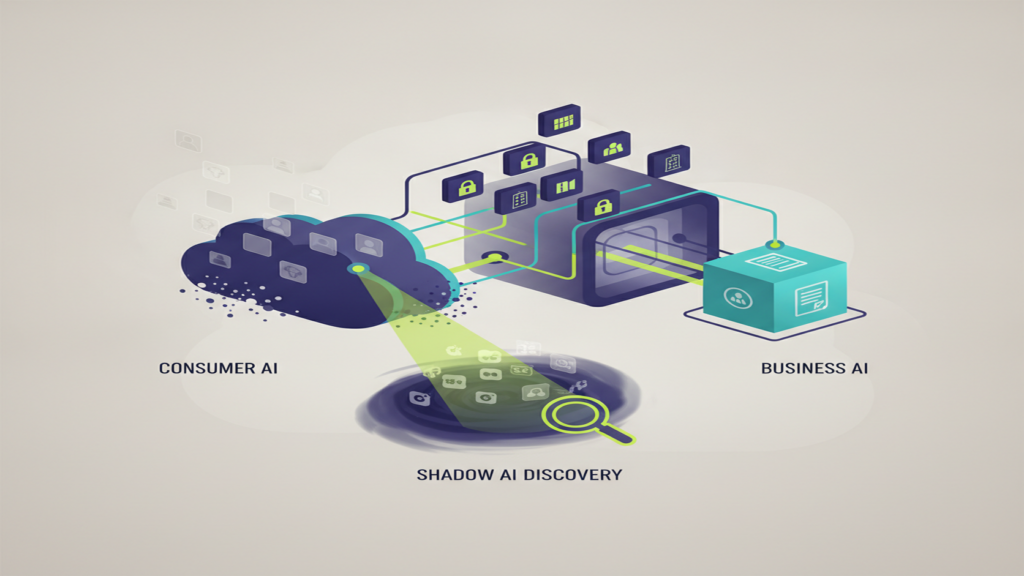
Step One: Shadow AI Discovery
Shadow AI is the AI usage happening in your organization that nobody has inventoried. Before you write an AI policy, find out what you are actually writing a policy about. A discovery exercise typically takes a few days of effort and draws from sources you already have.
Network and DNS telemetry. Outbound traffic to known AI provider domains shows which endpoints are reaching which services and roughly how often. This is the fastest signal and usually the most surprising to leadership.
Browser extension inventory. AI writing assistants, meeting note-takers, and summarizers install as extensions. Many request broad page-read permissions. Endpoint management tooling can enumerate what’s installed across the fleet.
Expense and card reports. Individual $20/month AI subscriptions reimbursed through expense reports are a direct list of who has already decided AI is worth paying for.
Calendar and meeting artifacts. Unfamiliar bot participants joining client calls to record and transcribe are a common finding, and one with real consequence in regulated verticals. A transcription bot on a client intake call at a law firm or a patient consultation at a medical practice is a disclosure question, not just an IT question.
Ask people. A short, non-punitive survey that opens with “we’re building an approved list, tell us what’s working for you” produces better data than any scan. Staff will tell you honestly if the framing is clearly not disciplinary.
The output of discovery is a simple inventory: tool, who’s using it, what category of data touches it, and whether a business agreement exists. That inventory is what makes the next conversation productive instead of theoretical.
Step Two: A Short AI Policy People Will Actually Read
An AI policy that runs fourteen pages will be acknowledged and ignored. The version that works for a 25-to-300-person company fits on two pages and answers four questions.
What’s approved. Name the specific tools and account types. “Microsoft Copilot accessed through your work account” is clear. “Approved AI tools” is not.
What never gets pasted. Be concrete by vertical. For a medical or dental practice: no patient identifiers, no chart content, no insurance details. For a law firm: nothing covered by privilege, no client-identifying matter detail. For manufacturing with defense work: no controlled technical data, no drawings, no export-controlled specifications. For professional services and finance: no client financials, no account numbers, no unpublished deal information. For construction: be thoughtful about bid pricing, subcontractor rates, and anything under an owner NDA.
What requires human review. Anything going to a client, a regulator, a court, a patient, or a payer. AI can draft and summarize and reorganize; it cannot exercise professional judgment, and it should never be the final reviewer on legal, medical, or financial advice.
Who to ask. One named role, one email address. Most policy violations are questions that had nowhere to go.
Step Three: Give People a Sanctioned Path
Policy without a working alternative is just a prohibition. If your team is already using AI for summarization and drafting, the fix is to license a business-tier tool that does those jobs inside your tenant boundary.
For most SMBs already standardized on Microsoft 365, Copilot is the shortest path, because it inherits the permission model you have already built. Files an employee cannot open are files Copilot will not summarize for them. That property is only as good as your underlying permissions, though. If your SharePoint sites have grown organically for eight years and half of them are open to “everyone,” a permissions cleanup comes before Copilot rollout, not after. That work is unglamorous and it is the single highest-value prerequisite we see.
Realistic expectation-setting matters here too. Business-tier AI licensing runs per user per month and adds up quickly across a 150-person company. Start with the 15 to 25 people whose work is most document-heavy, measure what they actually save over a quarter, and expand on evidence rather than enthusiasm.
Vendor Due Diligence: Five Questions
When a department wants to add an AI-enabled tool, ask the vendor in writing:
- Is our content used to train your models, or any third party’s models? Is that the default or an opt-in?
- What is your retention period, and what is your deletion commitment when we terminate?
- Which subprocessors receive our data, and in what geographies is it stored?
- Will you sign a BAA, or provide the specific contractual terms our compliance framework requires?
- What admin logging and policy controls do we get?
Vague answers to question one are the strongest signal to keep looking.
Where Century Fits
We do shadow AI discovery, permission remediation, policy drafting, and Copilot rollout for SMBs across Atlanta and the Southeast, and we do it in that order because skipping steps creates rework. If you want to see what your organization is actually using before you decide anything, that’s a short, low-commitment place to start.
Book a 30-minute discovery call through our contact page, or read more about how we approach cybersecurity and the compliance realities specific to your industry. No pitch deck, no pressure — just a clear picture of where your data is going and what it would take to bring it back inside a boundary you control.